 EN
 IT

Export
Export v2
Easily export for web and print
Presets, print preparation, watermarking and final sharpening: get every image ready to share in a couple of clicks.

Discover Every Feature
Control your export
with a single plugin
Every Export tool, in one view.

The right format, every time
Get the perfect format and size for every specific use: website, social network, fine art print and more.
-
Custom presetsSave your favorite export settings and reuse them with one click.
-
Simplified exportCuts a multi-step export down to a single action.
-
Guided workflowWalks you through every export decision in the right order.

Never lose track of a file again
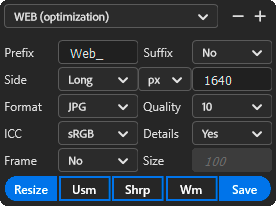
Add a Prefix to differentiate specific formats, or a Suffix to append technical info like dimensions and color profile.
-
Custom renamingAdds a prefix to keep exported formats organized.
-
Advanced renamingAppends technical info like dimensions or color profile to the filename.

Resize for web or print
The intuitive Side parameter lets you quickly switch between resize types.
-
Smart resizePicks the right resize method automatically based on your destination.
-
Custom resizeSets an exact width, height or resolution by hand.
-
Different units for web & printSwitches between pixels and inches/cm depending on the output.

JPG, PNG or TIFF, your call
Customize the type and quality of the exported file.
-
JPG, PNG and TIFFExports in the file format each destination actually needs.
-
Quality & compression controlBalances file size against visible quality loss.

The right profile, from web to fine art print
The ICC section always gives you the right profile for every use, while Details lets you adjust the final sharpening level.
-
Color profile managementApplies the correct color profile for the destination, from web to print.
-
Web optimizationPrepares images for fast, accurate display on screens.
-
Fine Art PrintPrepares images with the color depth fine-art printing needs.

An elegant passepartout
Add an elegant passepartout to your exported images.
-
Frame switchTurns the passepartout border on or off.
-
Frame colorSets the border color to match your print.
-
Frame sizeControls how wide the passepartout border is.

Finish the job, one button at a time
Resize duplicates and resizes in a new document without saving yet, Usm and Shrp sharpen the details, WM opens the watermark settings, and Save exports the file to disk.
-
Optimized resizeDuplicates and resizes into a new document without touching your original.
-
Optimized exportApplies the final sharpening pass before saving.
-
Resize & export workflowChains resize, sharpen and save into one guided sequence.
Your signature, every photo
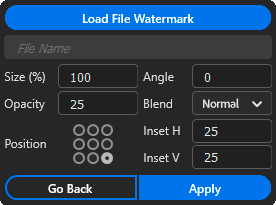
Manage every watermark preset: select and customize your watermark in a few clicks.
-
Watermark presetSaves a signature watermark you can reapply to any photo.
-
Customize watermarkAdjusts position, size and opacity of your watermark.
-
Insert watermarkStamps the watermark onto the exported image.
No Surprises
No subscription,
yours for good
A single payment and no auto-renewal.