 EN
 IT
Luminosity, tonality and color masks
Tonality Masks v10
SPECTRUM System 16/32-bit
The world's first plugin to introduce selections and masks based on warm and cool color tonalities with advanced 16/32-bit algorithms.
Available on
Windows
macOS
Surgical Precision, Zero Compromise
Select the impossible with SPECTRUM
A 32-bit algorithm works on tones the eye perceives but that are impossible to achieve with manual masks.
-
Shades Without CompromiseWork on luminosity, color and tone, with granular control over every shade in the image.
-
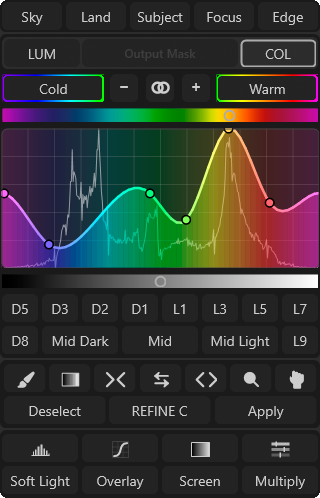
Advanced Color SelectionThe selection happens through a parametric curve impossible to replicate with traditional Photoshop tools, to isolate any color tone.
-
The SPECTRUM algorithm up to 32-bitGet clean, gradual masks, from the first to the last pixel, with no artifacts, posterization or harsh transitions.
Built To Fit Your Workflow
Everything you need
in one single tool
For amateurs and professionals: the tool adapts to your needs.

Smart AI masks in one click
-
Select skyIsolate the sky, ready for a localized adjustment.
-
Select foregroundInstantly separate the foreground from the background.
-
Select subjectsDetect people and objects so you can grade them independently.
-
Select by focusBuild a depth mask based on the focus in your image.
-
Select edgesBuild a precise mask along edges to prevent or fix edges and halos.

Work on light, color, or both
-
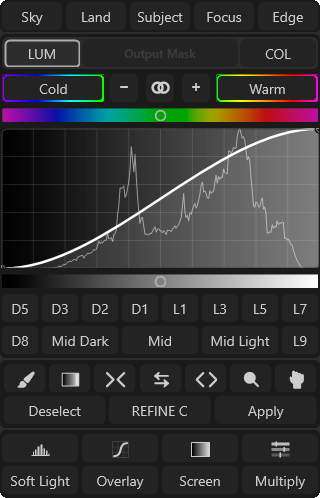
Luminosity SelectorWork on the section dedicated to your image's luminosity.
-
Color SelectorWork on the section dedicated to your image's color.
-
Intersection SelectorGets the intersection of Luminosity masks with Color masks for extreme control.
-
Real-time color previewWhen you enable the intersection, the curve in Lum takes on the average color intersected in the Col section.
-
Direct comparisonSwitching between Lum and Col lets you edit masks visually with ease.

Parametric color and tonality masks
-
Cool tone masksSelect the cool tones of the image for targeted grading.
-
Warm tone masksSelect the warm tones of the image for targeted grading.
-
Color masksBuild a mask from a specific hue anywhere in the image.
-
Spectral-based masksUses the SPECTRUM algorithm to isolate any color with a precision impossible with traditional methods.

Any selection on tonality and color
-
Real-time histogramSee what information is present in the image without trial and error.
-
Multi-point curveBuild soft, banding-free selections and masks for maximum control.
-
Curve preset savingSave mask curves as presets to recall them instantly on any image.

Selections on luminosity and Ansel Adams zones
-
Real-time histogramVisualize your image's tonal distribution while building the mask, without trial and error.
-
Multi-point curveBuild soft, banding-free selections across the whole tonal range, with maximum control.
-
Curve preset savingSave luminosity curves as presets to recall them instantly on any image.
-
Advanced real-time editingEdit the mask and watch the result update instantly, without applying and checking every time.

The classic way, reinvented
-
Customizable masksRight-click the mask buttons to set the desired mask depth.
-
Adjustable masks with parametric sliderContinuously adjust the mask's width and softness with a simple slider.
-
Highlights masksTarget only the brightest parts of the image.
-
Midtones masksIsolate the mid-brightness range for balanced adjustments.
-
Shadows masksTarget only the darkest parts of the image.
-
Ansel Adams zone masksPrecisely select one of the eleven zones of the Ansel Adams Zone System.

Customize and optimize the mask
-
Advanced optimization through curvesReshape a mask's tonal response with a dedicated curve.
-
Brushes, gradients & Dodge & BurnHand-paint, gradient-fill or Dodge & Burn directly onto any mask.
-
Convert masks/selectionsSwitch freely between a mask and a Photoshop selection.
-
Expand and Contract mask or selectionWiden or narrow the edges of a mask or selection with a simple slider.
-
Customizable toolsEvery tool in this section can be customized by right-clicking its individual buttons.

Adjustment layers and Dodge & Burn
-
Adjustment layersA pre-named Levels adjustment layer, already linked to the mask.
-
Dodge & BurnSet the layer's blend mode to get the desired effect.
-
Customizable toolsEvery tool in this section can be customized by right-clicking its individual buttons.
Watch It In Action
The complete guide to Tonality Masks
No Surprises
No subscription,
yours for good
A single payment and no auto-renewal.